Error has occurred!
- KB203
- Aug 11, 2020 01:39 PM
How do I freehand highlight content in documents containing mostly images?
Question:
How do I highlight content in documents that contain only images?
How do I freehand highlight a document?
Answer:
The Rectangle and Pencil Tool can both be used for this purpose.
- Click the Home tab.
- Click the Rectangle Tool.

- Click and drag the pointer to determine the dimensions of the highlight:
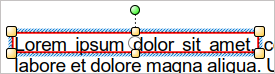
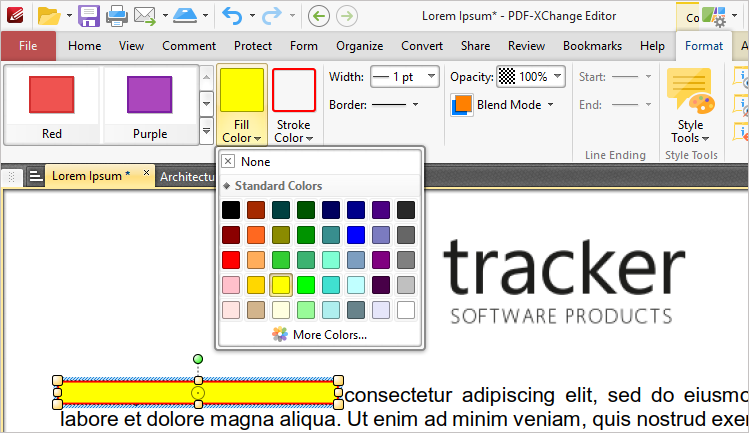
- Click the Format tab, then click the Fill Color dropdown menu to select a color for the highlight.
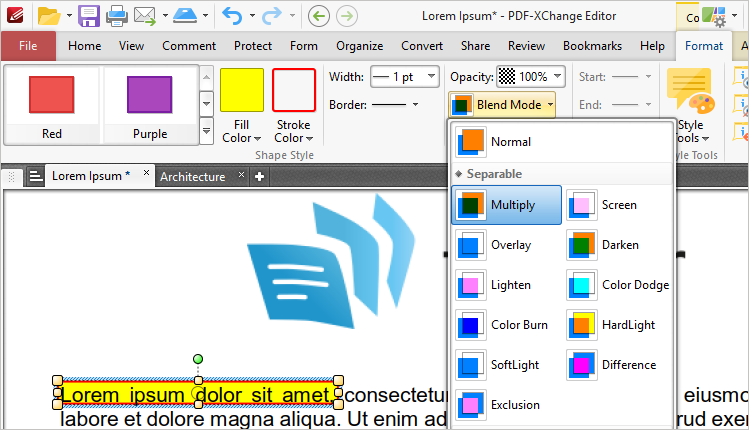
- Select Multiply from the Blend Mode dropdown menu to allow background objects to show through the highlight. The Opacity Dropdown can be used to determine the level or transparency in the highlight.
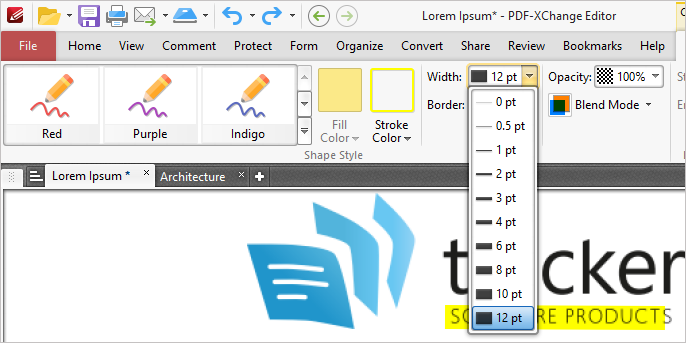
When using the Pencil tool, note that you will have to adjust the stroke width to highlight content:
Please note:
- The other Comment and Markup Tools can be used to create highlights of different shapes.
- The Comment Styles Palette can be used to save customized highlighters for subsequent use. See here for further information.
- To De-select the now enabled comment style, you can either select another tool, such as the Hand, or you can right click on the tool you are using and choose another style.
More Like This
- KB#456: How Do I Customize toolbars in PDF-XChange Editor?
- KB#282: Why won't the "Send by E-mail" feature work in conjunction with Microsoft Outlook?
- KB#338: What are the MSI installation switch options for the PDF-XChange family of products?
- KB#447: How do I determine what version I should install/how can I retrieve my serial key?
- KB#554: How do I Manage my License keys in V9?