Error has occurred!
- KB256
- Oct 09, 2023 08:28 AM
How do I export the PDF-XChange Print Driver settings to file?
Question:
How do I export the PDF-XChange Print Driver settings to file?
Answer:
Customized settings are defined as profiles in the PDF-XChange Print Driver. It is necessary to create a profile before settings can be exported. Detailed information on profiles is available here.
Follow the steps below to export profiles:
1. Move to the Control Panel.
2. Click Devices and Printers.
2. Right-click PDF-XChange Standard. A submenu will be displayed.
3. Click Printing preferences. The Printing Preferences dialog box will open. Profile options are detailed in the upper-right section of the dialog box:
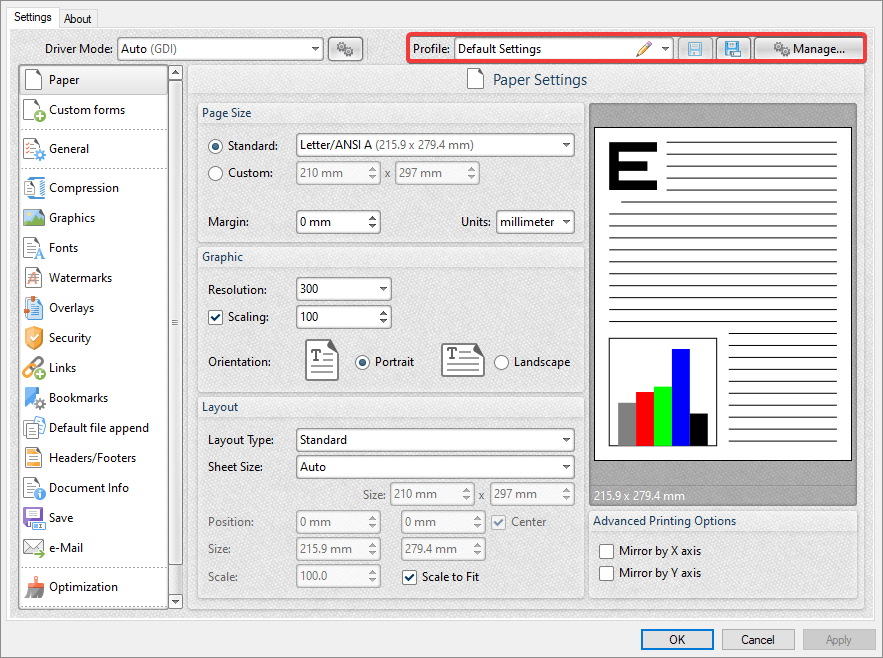
4. Click Manage. The Profiles Manager dialog box will open:
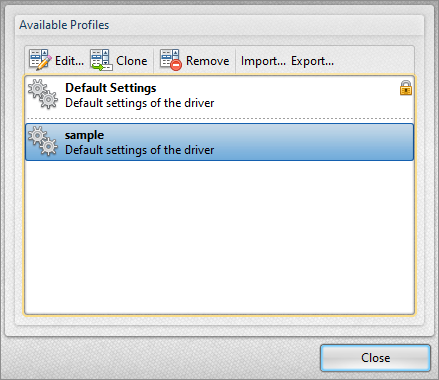
5. Select the desired profile and click Export. The Select Profile File dialog box will open.
6. Enter a name for the file in the File Name text box and click Save.
A *.pxpp file will be created that contains all the settings of the profile. The Profiles Manager dialog box detailed above can be used to import profiles as desired. Click Import and select the *.pxpp file when PDF-XChange Standard prompts for a profile to import.
More Like This
- KB#456: How Do I Customize toolbars in PDF-XChange Editor?
- KB#282: Why won't the "Send by E-mail" feature work in conjunction with Microsoft Outlook?
- KB#338: What are the MSI installation switch options for the PDF-XChange family of products?
- KB#447: How do I determine what version I should install/how can I retrieve my serial key?
- KB#195: What is the difference between Place Signature, Sign Document and Certify in PDF?