Error has occurred!
- KB288
- Oct 10, 2023 09:39 AM
Why is the Print dialog box larger than my screen in PDF-XChange Editor? I can't see all of the options. How do I adjust the size?
Question:
Why is the Print dialog box larger than my screen in PDF-XChange Editor? I can't see all of the options. How do I adjust the size?
Answer:
PDF-XChange Editor uses Windows system settings to get fonts for the user interface. If large fonts are used and your screen resolution is smaller than 1024x768 pixels, then some dialog boxes may be larger than your screen.
Resolution:
There are two ways to resolve this issue.
The first option is to increase the screen resolution to 1024 x768:
1. Move to the Control Panel.
2. Click Display.
3. Click Adjust resolution and then change the values as required.
The second option is to reduce the font size used in PDF-XChange Editor:
1. Click Edit in the Menu Toolbar.
2. Click Preferences.
3. Select Customize UI in the Categories section.
4. Use the font size dropdown menus to determine a new font size:
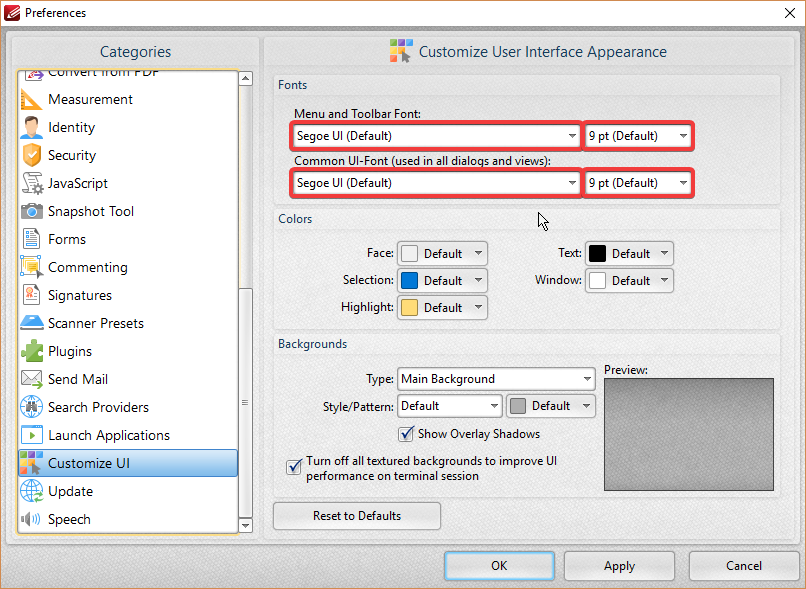
5. Click Apply and then click OK.
More Like This
- KB#282: Why won't the "Send by E-mail" feature work in conjunction with Microsoft Outlook?
- KB#456: How Do I Customize toolbars in PDF-XChange Editor?
- KB#338: What are the MSI installation switch options for the PDF-XChange family of products?
- KB#447: How do I determine what version I should install/how can I retrieve my serial key?
- KB#415: Can I use PDF-XChange Editor to edit pages?