Error has occurred!
- KB289
- Feb 23, 2022 09:25 AM
How do I reduce the file size of documents in PDF-Xchange?
There are several options that reduce the size of created files in all of our products. However, it should be noted that the default settings are very efficient at creating small PDF documents. Additionally, it should also be noted that certain elements of content - especially images - do not compress as well as other elements. There is always a trade off between size and quality when compression is used. The default settings of the products reflect what we view to be a good balance between both of these factors.
Compression options for each product are detailed in the sections below (click headers to open)
PDF-XChange Editor
The most effective method to reduce the size of files in PDF-XChange Editor is to use the Save as Optimized feature:
1. Click File in the Ribbon Toolbar.
2. Click Save as Optimized. The Optimize PDF dialog box will open.
3. Ensure all check boxes are selected for data considered non-essential in terms of quality and change the compression format to bicubic for all image formats:
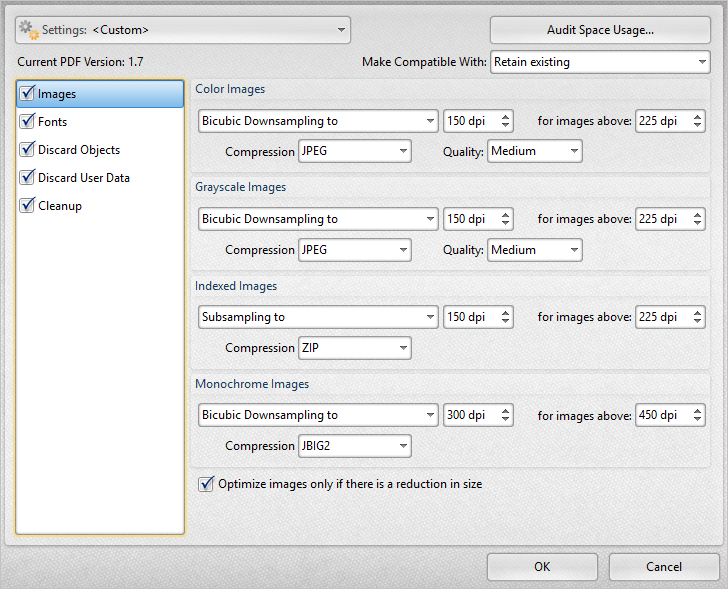
5. Click OK.
If the file size is still too large then reduce the values in the dpi text boxes and/or change the values in the Quality dropdown menus and try again. Note: Image quality will be impacted when these values are reduced. If you need additional details about what each of the options provided here do, please see our User Manual.
PDF-XChange Standard
This is Exclusive to PDF-XChange Standard, included in the PDF-XChange PRO bundle.
There are two methods that can be used to reduce the file size in PDF-XChange Standard.
The first method is to adjust the Compression settings:
1. Move to the Control Panel.
2. Click Devices and Printers.
3. Right-click PDF-XChange Standard and select Printing preferences. The Printing preferences dialog box will open.
4. Click the Compression tab and reduce the JPEG quality to 50%:
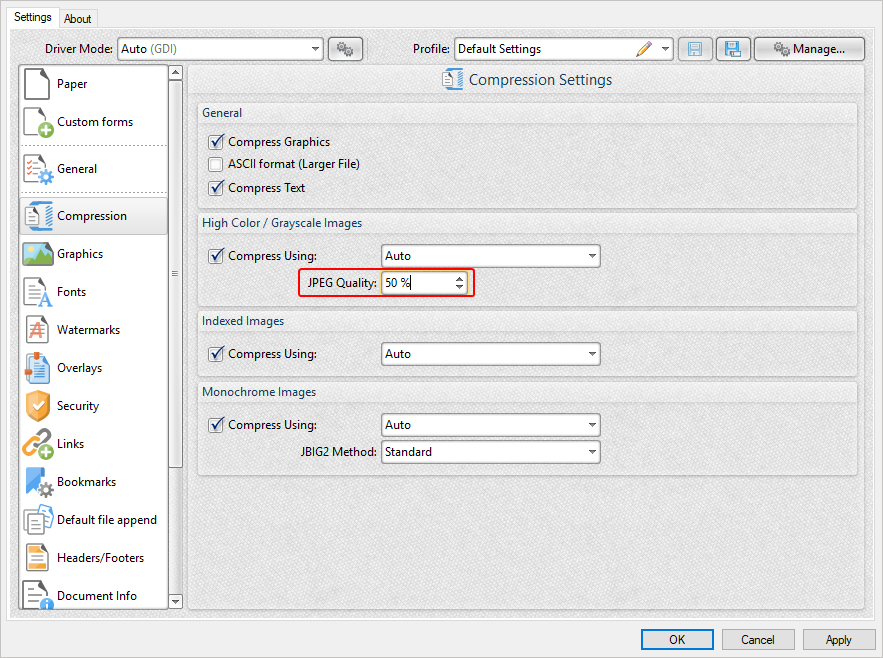
This process should significantly reduce the file size in cases where files contain images. The JPEG quality can be reduced further than 50% in order to reduce the file size further, but this will have an impact on quality.
The second method is to adjust the Graphics settings:
1. Move to the Control Panel.
2. Click Devices and Printers.
3. Right-click PDF-XChange Standard and select Printing preferences. The Printing preferences dialog box will open.
4. Click the Graphics tab and use the dropdown menus to change the downsampling method to Bicubic Downsampling for High Color/Grayscale Images, Indexed Images and Monochrome Images:
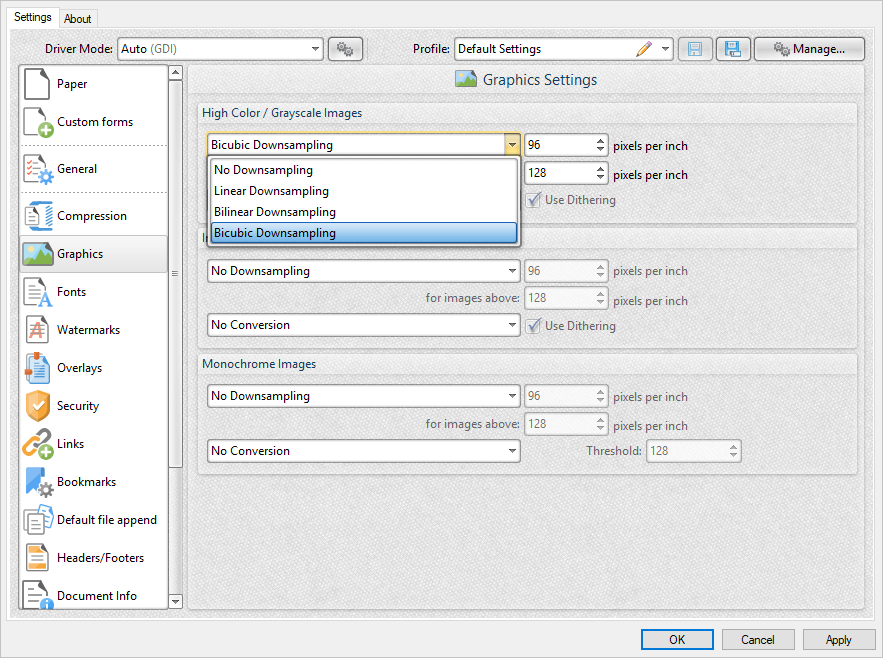
5. Click Apply and then click OK.
If the file size is still too large then reduce the values in the pixels per inch text boxes and try again. N.b. Image quality will be impacted when these values are reduced.
PDF-Tools
The most effective method to reduce the size of files in PDF-Tools is to use the Optimize PDF Tool:
1. Open PDF-Tools.
2. Click the Optimize PDF category and then double-click the Optimize PDF Tool:
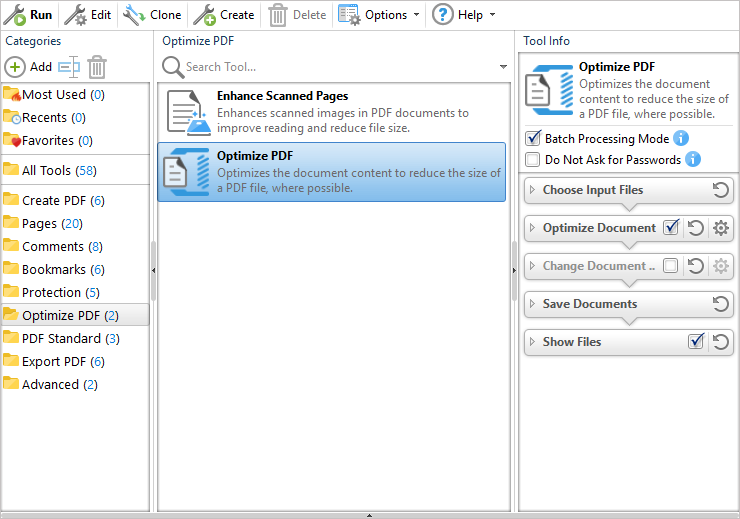
3. Select the file to be optimized and click Open.
4. Name and save the optimized file.
If the file is still too large then adjust the compression settings as follows:
1. Open PDF-Tools.
2. Click the Optimize PDF category.
3. Right-click the Optimize PDF Tool and click Edit. The Tool Actions Sequence for the Optimize PDF Tool will open.
4. Click All Options in the Optimize Document section:
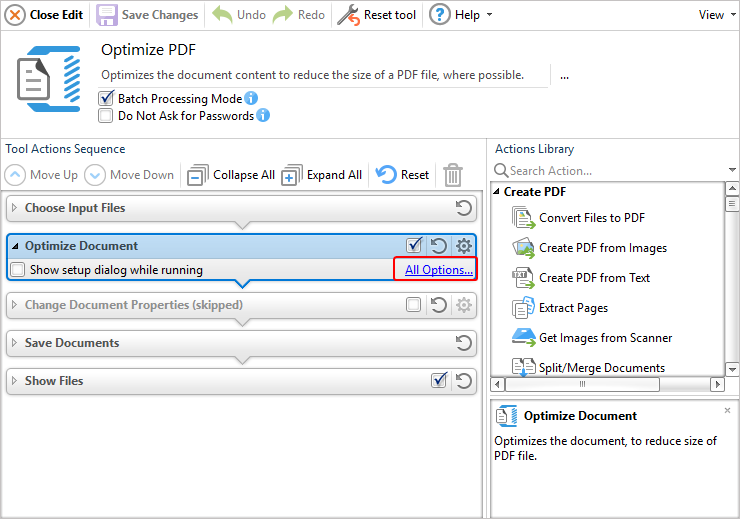
The Optimize PDF dialog box will open.
5. Ensure all check boxes are selected for data considered non-essential in terms of quality and change the compression format to bicubic for all image formats:
6. Click OK.
7. Click Save Changes, then click Close Edit and optimize the file again.
If the file size is still too large then reduce the values in the dpi text boxes in the dialog box above and/or change the values in the Quality dropdown menus and try again. N.b. Image quality will be impacted when these values are reduced.
Re-Printing PDF to PDF
It is never a good idea to print a PDF to PDF as it usually creates more problems than it solves. This should be attempted only as an absolute last resort and when all other avenues have failed.
It is always a better option to save your PDF rather than reprint it. If the solutions in this article did not help you, please first contact support@pdf-xchange.com for assistance with your files.
Once all of the above has been thoroughly read and attempted, and you are 100% certain that printing PDF to PDF is the only remaining option, this KB may help you resolve the issue.
More Like This
- KB#456: How Do I Customize toolbars in PDF-XChange Editor?
- KB#415: Can I use PDF-XChange Editor to edit pages?
- KB#268: Why do the PDF-XChange products display the "File Info" of some PDF files in strange characters, whereas Adobe and other programs display readable information?
- KB#227: I have an issue using the PDF-XChange SDK sample code with Microsoft Visual Basic in 'Interactive Mode' for debugging.
- KB#282: Why won't the "Send by E-mail" feature work in conjunction with Microsoft Outlook?