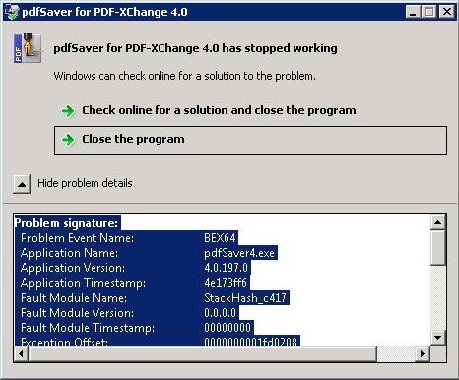
Paul - Tracker Supp wrote:Thanks for that Jim,
So your customer has been running this for years and recently have seen this behaviour start on the same hardware that worked reliably or is the a new customer with different hardware and you are referring to your product having been working for years for others?
We have over 80 sites running our ERP system worldwide, this problem happens intermittently on a number of these sites but is currently most troublesome on one particular site, however although the frequency of the problem is low, it only happens every couple of weeks, this is still a major issue for us.
This particular customer has been running the system for many years, I am not aware of any particularly recent hardware or operating system updates but then again we are not responsible for that side of things, each site has their own separate IT support either internal or supplied by other vendors.
The ERP framework platform is a self contained 4GL it almost never changes, code in the ERP system runs inside the ERP system environment, the code is a dialect of COBOL, this code has almost no interaction with any other part of the operating system it is all self contained, changes to it cannot affect the server it runs on and it only interacts with the Report and Document chain via shell execute calls, the Report and Document code also hasn't changed for years, certainly we add new reports to Access sometimes and modify reports but they all print via the same VBA subroutine that again has not changed in years.
Paul - Tracker Supp wrote:
If it is the same customer and hardware we need to ascertain what has changed. If it is only our components that have changed then perhaps the best thing to do is roll back to the last build that performed without these issues. If you can tell us what build was good we can supply you with that build, you can run it and find out if that resolves the issue. If the issue persists then it suggests there must be something other than our software at the root of this.
It started going wrong quite some time ago probably over a year, so I am not really sure which version would have been deemed stable, our support department only really got me (development) involved with it in the last few months prior to that they would just have been grabbing your latest release and updating, because the problem is intermittent this can look like a solution but it's not the best approach so I must apologise that we don't have good data on the problem.
However since they got me involved we have been recording as much information as possible, for example identifying which reports it happens with, time of day, which user, server loading at the time it happens and so on, we record a lot of data about reports that are run, however it's inconsistent, there is no clear pattern of any one specific report or time of day, server load etc.
Please believe me when I say that we would always suspect our programs first, but with it just being Access printing to a printer it's hard to see where the problem could lie.
The only things I can think of would be in relation to the lifetime of the Automation Proxy for controlling the printer, we create one unique Access instance to service each report, each instance even has its own physical copy of the report mdb file that is not shared with any other instance of MSAccess, on completion of a report print run, this instance is allowed to close, we do not do any specific garbage collection on the Automation proxy as I think we had problems with that many years back. The MSAccess code is based on your example code by the way, it's pretty simplistic, basically it's
Create proxy
get printer instance name from the proxy
pass our unlock credentials
set application printer to the supplied printer
open the report
pass all the control options including file name we want for the pdf the to the proxy
do the print
close the report
let access exit
So we are regularly creating late bound automation proxies via VBA CreateObject() that have a lifetime of 1 report inside one process.
While it does not happen that often, we do get sites where we can have up to three or four simultaneous reports running however from our report history database and the exception times we can see that this has not been an issue of multiple reports when this exception has been occuring.
Paul - Tracker Supp wrote:
Alternatively we could supply you with a full debug version but that could be costly in time and effort for all parties and may effect your system performance. Given that this is a production server this may not be an ideal solution however.
I am assuming that PdfSaver is written in C++ so you would have to ship the debug symbols and so on, I think we would be happy enough test a debug version at this particular site, if it were causing problems the customer would let us know pretty quickly and if not it would certainly help us get to the bottom of this.
Jim