Error has occurred!
- KB250
- Apr 22, 2020 04:02 PM
What are the differences between the installation packages? Also, what is the portable version of PDF-XChange Editor?
What are the differences between the installation packages? What is the portable version of PDF-XChange Editor?
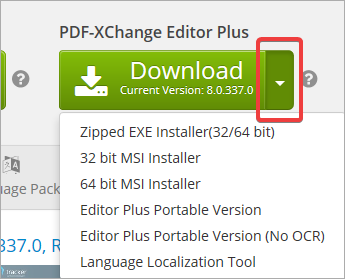
Note that all Installation packages mentioned in this article can be downloaded from your account page, or the relevant product page, by clicking the dropdown arrow beside any download button. Portable versions are only available for the Editor, (the Printers and PDF-Tools cannot be made into portable versions).
Installation Packages
Installation packages are available in *.zip and *.msi format.
The .zip installer contains an *.exe installer with all data necessary to install applications on both 32 and 64 bit operating systems, and will detect the correct architecture to use. We offer the .zip alternative because some systems do not permit the downloading of *.exe files. If the installation is taking place on a small number of machines then this installation package is recommended.
The .msi installers are for system administrators. They facilitate the installation of our products on a large number of machines - for example a company network. End users should not use these installers without good reason and excellent understanding of the processes involved.
Portable Version
The portable version of PDF-XChange Editor does not require installation and makes no changes to the registry of the computer on which it is used. This means that it can be saved onto a portable device such as a USB stick and used in any location. All user settings are stored in the same folder as the application.
Also, the portable version is always 32 bit, which makes it a convenient workaround in cases where users have 64 bit operating systems but 32 bit scanner drivers.
More Like This
- KB#282: Why won't the "Send by E-mail" feature work in conjunction with Microsoft Outlook?
- KB#338: What are the MSI installation switch options for the PDF-XChange family of products?
- KB#456: How Do I Customize toolbars in PDF-XChange Editor?
- KB#447: How do I determine what version I should install/how can I retrieve my serial key?
- KB#286: How do I manage licenses for PDF-XChange Products on a Windows Terminal Server?