Error has occurred!
- KB286
- Jun 15, 2023 01:19 PM
How do I manage licenses for PDF-XChange Products on a Windows Terminal Server?
Symptoms
I want to deploy both free and licensed versions of PDF-XChange products on a Windows Terminal Server. How do I specify only certain users to have access to the full version?
Cause
If a license for any PDF-XChange product is applied during install it will be available for all users.
Resolution
Choose the install method that best represents your company needs:
Licensing on Terminal Server with PDF-XChange is essentially handled by either running the installation with the serial key or without. For per user licensing install the Software with no license and apply the key in each user's session.Note: Because of the way settings from the registry are used in a Remote Desktop Services Server (Previously known as "Terminal Server") it is important that you open an Administrative Command Prompt and issue the command change user /install before running the PDF-XChange installer and then the command change user /execute once your set up is complete. This ensures that settings from the installation are available to your users once the install is completed. See this Microsoft article for details if you are unsure of how this command works: http://support.microsoft.com/kb/186504
Installing PDF-XChange on a Terminal Server in Licensed mode, for all users:
When you install PDF-XChange, if you include the serial Key in the installation, then all users of your Terminal Server will have access to the full Licensed features of the software. You can then, through Group Policy and/or NTFS permissions, restrict the program only to those users you choose.
Advantages: All users have full access to all the features of the the software and no license keys need be installed by individual users.
Disadvantages: Requires detailed management of user permissions. All users who are to have full access to all the features of the the software, must have rights and permissions to access the software set explicitly. Typically this is done through a Group Policy. All other users must be explicitly restricted access to the software.
Please note that we do not have a concurrent user license model, so all users who have access to the full software need to have a valid PDF-XChange License.
Note also that the xcvault file cannot be used directly in a GUI install on your Terminal Server to apply the license properly, one must either use of the command line to pass the key or paste the key string into the installer GUI.:
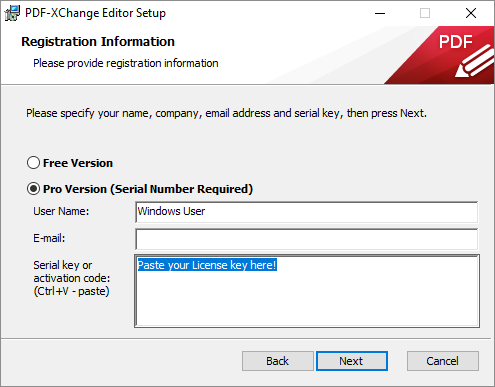
Installed this way all you users that can log into an RDS session will have access to the fully licensed Editor.
Installing PDF-XChange on a Terminal Server in Trial mode for all users:
When you install PDF-XChange, if you do not include the serial Key in the installation, then all users of your RDS Server will only have access to the free features of the Software (note that PDF-Tools and PDF-XChange Standard do not offer any free features, and will place demo watermarks without notice). If these users attempt to use licensed features of the Editor, a watermark will be placed on the document; The users are clearly warned before this happens and given the opportunity to cancel the operation that will add a water mark. In this scenario you might want to consider hiding the restricted licensed features. On a per user basis see this: https://www.pdf-xchange.com/knowledgebase/229 and to set it for all users at install time. Also see below at "Additional Tasks"
You can then pass the serial key to those users whom you wish to have Premium features and when they enter that serial in the Editor manually (they simply double click the xcvault file), it will be stored in the Windows Registry under CURRENT_USER so only those users will have access to the full product. Again it is your responsibility to ensure you have enough licenses to cover all those users.
Advantages: All users have access to only the free features of the the software and individual users can be given the key to unlock only their own profile to use the full Pro feature set. No permissions need be set up to manage access to the software.
Disadvantages: Requires any user who is to use the full featured version of the software to manually enter a serial key.
Additional Tasks
-
Make PDF-XChange the default for all users.
Details on setting these defaults via Group Policy can be found here: https://help.pdf-xchange.com/sysadmin/making-the-editor-the-default2.html
In you may find that after running the default install that not all users have the PDF-XChange Editor as their default application associated with PDF files and that setting this on a per user basis requires the users supplying an administrative password. To avoid this you can push this setting while still in change user /install mode immediately after installing the Editor by running the Editor executable at an Administrative command prompt (you should have one open still when you switched to change user /install mode). Before switching back to execute mode (change user /execute) navigate to the Editor installation directory which is by default C:\Program Files\Tracker Software\PDF Editor and issue the command:
Editor: PDFXEdit.exe /fileassoc:user=no// sets association for PDF files by file extenstion .pdf
Editor: PDFXEdit.exe /webassoc:user=no// sets association for PDF files by mime-type application/pdf
This will set the correct registry keys to later be copied to your user profiles when they first launch the Viewer or Editor.
-
Hide Restricted Licensed functions in the Free version.
If you have a non-licensed Editor for all users you may want to hide the Pro features so that users do not inadvertently use them resulting in permanently water marked documents. There is a Group Policy available for that in the Editor Group Policy Administrative Template. Policy Name: Hide All Licensed Features find the policy details here: https://help.pdf-xchange.com/sysadmin/editor-toolbars-menus-options.htmlNote that this option only affects the PDF-XChange Editor, any other products, such as PDF-Tools, and either of our Printer drivers can and will still place watermarks without warning if used without a valid license.
More Like This
- KB#447: How do I determine what version I should install/how can I retrieve my serial key?
- KB#554: How do I Manage my License keys in V9?
- KB#286: How do I manage licenses for PDF-XChange Products on a Windows Terminal Server?
- KB#282: Why won't the "Send by E-mail" feature work in conjunction with Microsoft Outlook?
- KB#456: How Do I Customize toolbars in PDF-XChange Editor?